Kubespray Private Kubernetes Cluster Expose to Public Network using Nginx
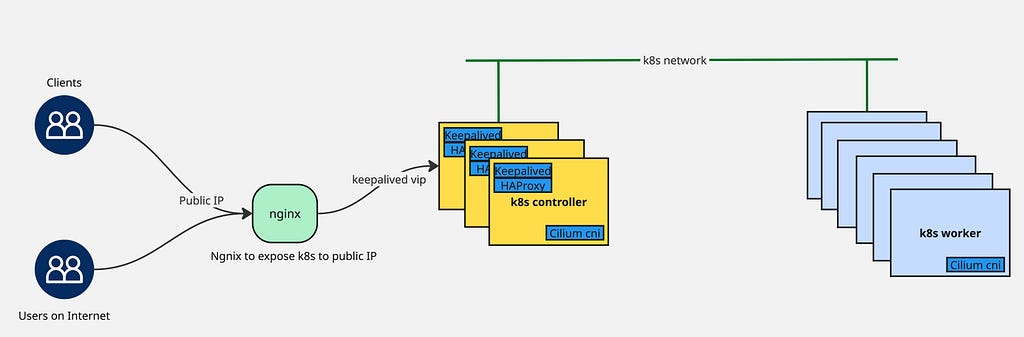
- 3 minsThe objective involves exposing a private Kubernetes cluster deployed within a datacenter to the public internet, enabling external access to internal Kubernetes resources.
Prerequisite
- Functional Kubernetes cluster (deployed via Kubespray)
- Nginx server instance (running on virtual machine with both public and private IP addresses)
Setup Keepalived
Install keepalived on all three controller nodes:
$ apt install keepalived
Configure keepalived identically across all controller nodes (adjusting priority values accordingly). The configuration uses 192.168.1.1 as the virtual IP for the Kubernetes API:
/etc/keepalived/keepalived.conf
global_defs {
router_id LVS_K8S
script_user root
enable_script_security
}
vrrp_script check_apiserver {
  script "/etc/keepalived/check_apiserver.sh"
  interval 3
  weight -2
  fall 10
  rise 2
}

vrrp_instance VI_1 {
    state MASTER
    interface bond0.31
    virtual_router_id 51
    priority 255
    authentication {
    auth_type PASS
    auth_pass SuperSecret123
    }
    virtual_ipaddress {
        192.168.1.1/22
    }
    track_script {
        check_apiserver
    }
    notify_master "/etc/keepalived/status_capture.sh MASTER"
    notify_backup "/etc/keepalived/status_capture.sh BACKUP"
    notify_fault  "/etc/keepalived/status_capture.sh FAULT"
}
/etc/keepalived/check_apiserver.sh
#!/bin/sh

errorExit() {
    echo "*** $*" 1>&2
    exit 1
}

curl --silent --max-time 2 --insecure https://localhost:8443/ -o /dev/null || errorExit "Error GET https://localhost:8443/"

if ip addr | grep -q 192.168.1.1; then
    curl --silent --max-time 2 --insecure https://192.168.1.1:8443/ -o /dev/null || errorExit "Error GET https://192.168.1.1:8443/"
fi
/etc/keepalived/status_capture.sh
#!/bin/bash
echo "$(date): The loadbalancer instance running on $(hostname) is currently marker $1" |tee /tmp/load-balancer-status
chmod 755 /tmp/load-balancer-status || true
Setup HAProxy
Install haproxy across all three controller nodes:
$ apt install haproxy
Configure haproxy consistently on each controller node:
frontend apiserver
  bind *:8443
  mode tcp
  option tcplog
  log 127.0.0.1 local0
  default_backend apiserver

backend apiserver
  option httpchk GET /healthz
  http-check expect status 200
  mode tcp
  option ssl-hello-chk
  balance     roundrobin
  server k8s-bos-1-m01 192.168.1.11:6443 check
  server k8s-bos-1-m02 192.168.1.12:6443 check
  server k8s-bos-1-m03 192.168.1.13:6443 check
Configure SANs Certificates in Kubernetes
Within your existing Kubernetes deployment, incorporate the new public domain name (k8s-public.example.com) into the API server certificate’s Subject Alternative Names to establish trust for that domain.
inventory/k8s/group_vars/all/all.yml
## External LB example config
apiserver_loadbalancer_domain_name: "k8s-private.example.com"
loadbalancer_apiserver:
   address: "192.168.1.1"
   port: "8443"

## Local loadbalancer should use this port
## And must be set port 6443
loadbalancer_apiserver_port: 6443

## If loadbalancer_apiserver_healthcheck_port variable defined, enables proxy liveness check for nginx.
loadbalancer_apiserver_healthcheck_port: 8081

## Add extra name in existing certificate
supplementary_addresses_in_ssl_keys:
  - "k8s-public.example.com"
Execute the Kubespray playbook to regenerate SAN certificates containing the specified domain name for the public endpoint:
$ ansible-playbook -i inventory/k8s/inventory.ini --become --become-user=root cluster.yml -e upgrade_cluster_setup=true
After playbook completion, validate the certificate on any controller node:
$ openssl x509 -in /etc/kubernetes/pki/apiserver.crt -text -noout | grep DNS
Nginx Setup
Install nginx:
$ apt install nginx
Update /etc/nginx/nginx.conf by adding this configuration block:
stream {
  include /etc/nginx/stream.d/*.conf;
}
Create configuration for Kubernetes at /etc/nginx/stream.d/k8s-bos-1.conf:
upstream api_backend {
    least_conn;
    # private endpoint of kubernetes cluster (This is keepalived vip)
    server k8s-private.example.com:8443 max_fails=3 fail_timeout=10s;
}

server {
    # public ip address to access k8s from outside
    listen 85.xxx.xxx.3:8443;

    proxy_connect_timeout 5s;
    proxy_timeout 30s;

    proxy_pass api_backend;
    proxy_ssl_name k8s-private.example.com;
    proxy_ssl_server_name on;
}
Testing
Access the Kubernetes cluster from any internet-connected location using curl:
$ curl https://k8s-public.example.com:8443 -k
{
  "kind": "Status",
  "apiVersion": "v1",
  "metadata": {},
  "status": "Failure",
  "message": "forbidden: User \"system:anonymous\" cannot get path \"/\"",
  "reason": "Forbidden",
  "details": {},
  "code": 403
}