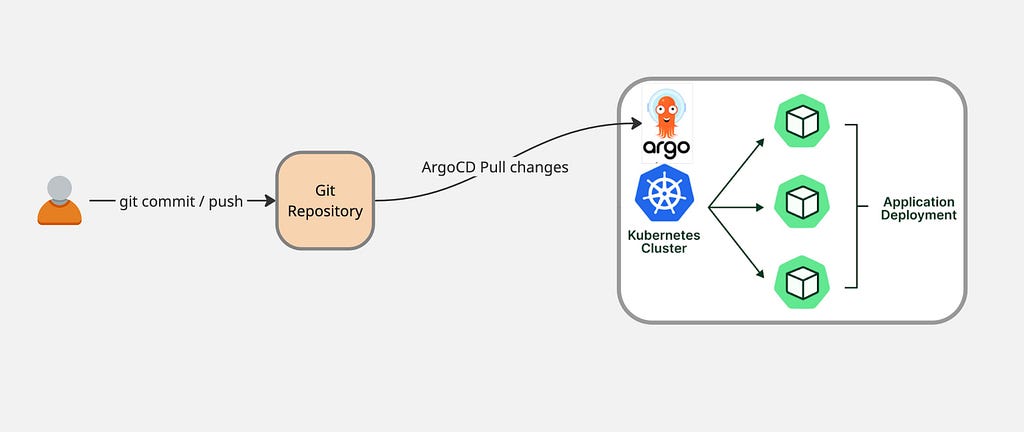
GitOps for Kubernetes with ArgoCD
- 3 minsArgo CD is a declarative, GitOps continuous delivery tool for Kubernetes that automatically synchronizes the desired application state in a Git repository with the live state of applications in a cluster.
GitOps practices in delivery pipelines enable users to manage deployments through Git push operations, with ArgoCD pulling all configuration from a Git repository.
Install ArgoCD
Create the namespace:
$ kubectl create namespace argocd
Install ArgoCD on your Kubernetes cluster:
$ kubectl apply -n argocd -f https://raw.githubusercontent.com/argoproj/argo-cd/stable/manifests/install.yaml
Expose the argocd-server service to access the GUI portal:
$ kubectl get svc -n argocd
NAME                                      TYPE           CLUSTER-IP     EXTERNAL-IP   PORT(S)                      AGE
argocd-applicationset-controller          ClusterIP      10.232.21.29   <none>        7000/TCP,8080/TCP            5h53m
argocd-dex-server                         ClusterIP      10.232.48.29   <none>        5556/TCP,5557/TCP,5558/TCP   5h53m
argocd-metrics                            ClusterIP      10.232.3.154   <none>        8082/TCP                     5h53m
argocd-notifications-controller-metrics   ClusterIP      10.232.42.21   <none>        9001/TCP                     5h53m
argocd-redis                              ClusterIP      10.232.9.251   <none>        6379/TCP                     5h53m
argocd-repo-server                        ClusterIP      10.232.8.25    <none>        8081/TCP,8084/TCP            5h53m
argocd-server                             LoadBalancer   10.232.5.151   10.0.74.1     80:31399/TCP,443:30373/TCP   5h53m
argocd-server-metrics                     ClusterIP      10.232.54.51   <none>        8083/TCP                     5h53m
Access the portal at https://10.0.74.1
Fetch admin credentials:
$ kubectl -n argocd get secret argocd-initial-admin-secret -o jsonpath="{.data.password}" | base64 -d; echo
vFPwsLa5-ATbs1w4
Deploy Application Using ArgoCD
Create a GitHub repository “argocd-demo-app”:
$ git clone https://github.com/satishdotpatel/argocd-demo-app.git
Create directory structure:
.
├── application.yaml
└── dev
    ├── deployment.yaml
    └── service.yaml
deployment.yaml:
apiVersion: apps/v1
kind: Deployment
metadata:
  name: argocd-app-deployment
  labels:
    app: argocd-app
spec:
  replicas: 10
  selector:
    matchLabels:
      app: argocd-app
  template:
    metadata:
      labels:
        app: argocd-app
    spec:
      containers:
      - name: argocd-app-container
        image: nginx:latest
        ports:
        - containerPort: 80
service.yaml:
apiVersion: v1
kind: Service
metadata:
  name: argocd-app-service
spec:
  selector:
    app: argocd-app
  ports:
    - protocol: TCP
      port: 80
      targetPort: 80
  type: LoadBalancer
application.yaml:
apiVersion: argoproj.io/v1alpha1
kind: Application
metadata:
  name: myapp-argo-application
  namespace: argocd
spec:
  project: default

  source:
    repoURL: https://github.com/satishdotpatel/argocd-demo-app.git
    targetRevision: HEAD
    path: dev
  destination:
    server: https://kubernetes.default.svc
    namespace: dev

  syncPolicy:
    syncOptions:
    - CreateNamespace=true

    automated:
      selfHeal: true
      prune: true
Deploy the application:
$ kubectl apply -f application.yaml
Testing GitOps Workflow
Modify deployment.yaml to change replicas from 10 to 3:
spec:
  replicas: 3
Commit and push changes:
$ git commit -m "changing replica count from 10 to 3" deployment.yaml
[main 33e5a94] changing replica count from 10 to 3
 1 file changed, 1 insertion(+), 1 deletion(-)

$ git push
Enumerating objects: 7, done.
Counting objects: 100% (7/7), done.
To https://github.com/satishdotpatel/argocd-demo-app.git
   e1704ef..33e5a94  main -> main
ArgoCD checks Git changes within approximately 3 minutes (default) and automatically syncs them to the cluster.
Notes
For private Git repositories, store credentials using Kubernetes secrets:
apiVersion: v1
kind: Secret
metadata:
  name: my-private-repo-creds
  namespace: argocd
  labels:
    argocd.argoproj.io/secret-type: repository
stringData:
  url: https://github.com/satishdotpatel/argocd-demo-app.git
  username: "satish.patel"
  password: "your-token-here"
Apply the secret:
$ kubectl apply -f my-private-repo-creds.yaml
ArgoCD will automatically fetch username and password from the Kubernetes secret for authentication.