Build Layer 3 Datacenter using BGP
- 9 minsA Layer-3 (L3) data center using FRR refers to a data center design where routing is done end-to-end (or at least between ToR / leaf switches and hosts) at layer 3, instead of relying heavily on L2 (VLANs) or overlays.
Motivation
Why reconsider traditional L2-based datacenter designs?
- VLAN limitations: scalability constraints (only ~4,000+ VLANs)
- Complexity and fragility of L2: spanning tree, broadcast domains, loop risks with larger risk domains
- Overlay networks (VXLAN) introduce additional overheads and complexity while still requiring VTEPs, multicast, and encapsulation overhead
Why Use BGP for L3 in a Data Center
- BGP scales very well in large fabrics because it doesn’t flood link-state updates like IGPs do
- With BGP unnumbered, you can peer using IPv6 link-local addresses, reducing the need for many IPv4 assignments on point-to-point links
- BGP avoids many broadcast/flooding issues of L2, with reliable loop prevention via AS path
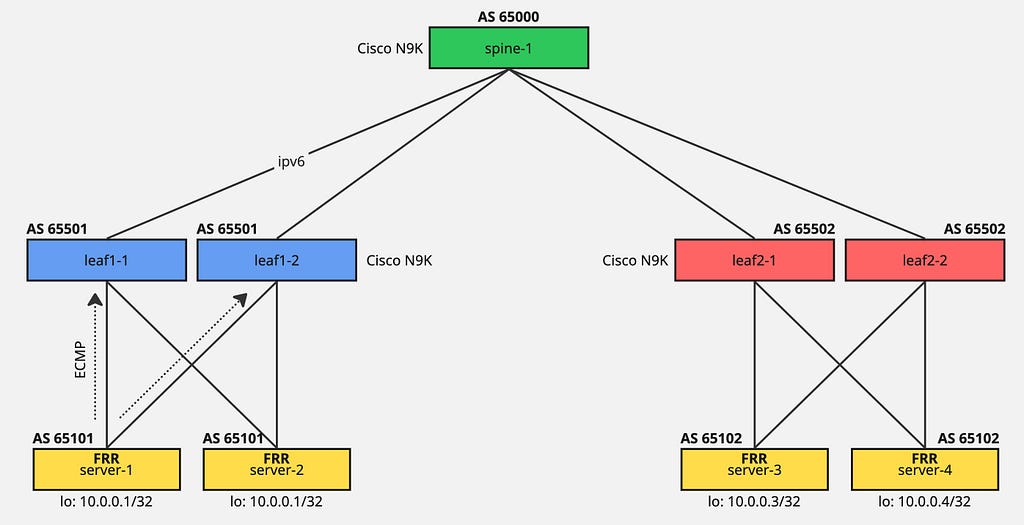
- In pure L3-based design, servers/hosts peer via BGP to each leaf or routing node, so redundancy relies on L3 routing + ECMP rather than L2 aggregation
Scope
This article uses FRR software. FRR is a fully featured, high performance, free software IP routing suite. It implements all standard routing protocols such as BGP, RIP, OSPF, IS-IS and more.
IPv6 link-local addresses are used for BGP peering to simplify automation and configuration.
Setup
Install FRR on Ubuntu 22.04:
$ apt install frr
Enable BGP daemon by setting bgpd=yes in /etc/frr/daemons:
bgpd=yes
$ systemctl start frr
Add 10.0.0.X IP address on loopback interface. For additional interface IPs, create a dummy interface:
$ ip link add rep type dummy
$ ip link set rep up
FRR Configuration on Hosts
The allowas-in BGP feature allows a router to accept routes even if its own AS number appears in the AS_PATH of those routes.
server-1 configuration:
frr version 8.1
frr defaults traditional
hostname server-1
log syslog informational
no ipv6 forwarding
service integrated-vtysh-config
!
interface ens2
 no ipv6 nd suppress-ra
exit
!
interface ens3
 no ipv6 nd suppress-ra
exit
!
interface lo
 ip address 10.0.0.1/32
exit
!
interface rep
 ip address 20.0.0.1/32
exit
!
router bgp 65101
 bgp router-id 10.0.0.1
 no bgp ebgp-requires-policy
 neighbor ens2 interface remote-as 65501
 neighbor ens3 interface remote-as 65501
 !
 address-family ipv4 unicast
  redistribute connected
  neighbor ens2 allowas-in
  neighbor ens3 allowas-in
 exit-address-family
exit
!
server-2 configuration:
frr version 8.1
frr defaults traditional
hostname server-2
log syslog informational
no ipv6 forwarding
service integrated-vtysh-config
!
interface ens2
 no ipv6 nd suppress-ra
exit
!
interface ens3
 no ipv6 nd suppress-ra
exit
!
interface lo
 ip address 10.0.0.2/32
exit
!
interface rep
 ip address 20.0.0.2/32
exit
!
router bgp 65101
 bgp router-id 10.0.0.2
 no bgp ebgp-requires-policy
 neighbor ens2 interface remote-as 65501
 neighbor ens3 interface remote-as 65501
 !
 address-family ipv4 unicast
  redistribute connected
  neighbor ens2 allowas-in
  neighbor ens3 allowas-in
 exit-address-family
exit
!
server-3 configuration:
frr version 8.1
frr defaults traditional
hostname server-3
log syslog informational
no ipv6 forwarding
service integrated-vtysh-config
!
interface ens2
 no ipv6 nd suppress-ra
exit
!
interface ens3
 no ipv6 nd suppress-ra
exit
!
interface lo
 ip address 10.0.0.3/32
exit
!
interface rep
 ip address 20.0.0.3/32
exit
!
router bgp 65102
 bgp router-id 10.0.0.3
 no bgp ebgp-requires-policy
 neighbor ens2 interface remote-as 65502
 neighbor ens3 interface remote-as 65502
 !
 address-family ipv4 unicast
  redistribute connected
  neighbor ens2 allowas-in
  neighbor ens3 allowas-in
 exit-address-family
exit
!
Spine Configuration
Currently using a single spine (production environments require multiple with different BGP ASNs):
interface Ethernet1/1
  no switchport
  ip forward
  ipv6 address use-link-local-only
  no shutdown

interface Ethernet1/2
  no switchport
  ip forward
  ipv6 address use-link-local-only
  no shutdown

interface Ethernet1/3
  no switchport
  ip forward
  ipv6 address use-link-local-only
  no shutdown

interface Ethernet1/4
  no switchport
  ip forward
  ipv6 address use-link-local-only
  no shutdown

interface loopback0
  ip address 192.168.0.1/32

route-map REDIR-CONN permit 10
  match interface loopback0
  set metric 20

router bgp 65500
  router-id 192.168.0.1
  address-family ipv4 unicast
    redistribute direct route-map REDIR-CONN
  neighbor Ethernet1/1
    remote-as 65501
    description ### eBGP peer to leaf1-1 ###
    address-family ipv4 unicast
  neighbor Ethernet1/2
    remote-as 65501
    description ### eBGP peer to leaf1-2 ###
    address-family ipv4 unicast
  neighbor Ethernet1/3
    remote-as 65502
    description ### eBGP peer to leaf2-1 ###
    address-family ipv4 unicast
  neighbor Ethernet1/4
    remote-as 65502
    description ### eBGP peer to leaf2-1 ###
    address-family ipv4 unicast
Leaf Configuration
Each leaf has similar configuration except for different AS numbers for peering.
The disable-peer-as-check feature normally refuses to advertise a prefix to an eBGP peer if that peer’s AS is already the last AS in the AS-PATH, to prevent simple loop conditions. ip forward allows routing IPv4 traffic over IPv6 next-hop addresses (RFC 5549).
leaf1-1 configuration:
interface Ethernet1/1
  description ### Link to server-1 ###
  no switchport
  ip forward
  ipv6 address use-link-local-only
  no shutdown

interface Ethernet1/2
  description ### Link to server-2 ###
  no switchport
  ip forward
  ipv6 address use-link-local-only
  no shutdown

interface Ethernet1/3
  description ### Link to spine-1 ###
  no switchport
  ip forward
  ipv6 address use-link-local-only
  no shutdown

interface loopback0
  ip address 192.168.1.1/32

route-map REDIR-CONN permit 10
  match interface loopback0
  set metric 20

router bgp 65501
  router-id 192.168.1.1
  address-family ipv4 unicast
    redistribute direct route-map REDIR-CONN
  neighbor Ethernet1/1
    remote-as 65101
    description ### eBGP peer to server-1 ###
    timers 5 15
    address-family ipv4 unicast
      disable-peer-as-check
  neighbor Ethernet1/2
    remote-as 65101
    description ### eBGP peer to server-2 ###
    timers 5 15
    address-family ipv4 unicast
      disable-peer-as-check
  neighbor Ethernet1/3
    remote-as 65500
    description ### eBGP peer to spine-1 ###
    address-family ipv4 unicast
leaf1-2 configuration:
router bgp 65501
  router-id 192.168.1.2
  address-family ipv4 unicast
    redistribute direct route-map REDIR-CONN
  neighbor Ethernet1/1
    remote-as 65101
    description ### eBGP peer to server-1 ###
    timers 5 15
    address-family ipv4 unicast
      disable-peer-as-check
  neighbor Ethernet1/2
    remote-as 65101
    description ### eBGP peer to server-2 ###
    timers 5 15
    address-family ipv4 unicast
      disable-peer-as-check
  neighbor Ethernet1/3
    remote-as 65500
    description ### eBGP peer to spine-1 ###
    address-family ipv4 unicast
Validation
Check BGP peering using vtysh:
root@server-1:~# vtysh

server-1# show ip bgp summary

IPv4 Unicast Summary (VRF default):
BGP router identifier 10.0.0.1, local AS number 65101 vrf-id 0
BGP table version 50
RIB entries 21, using 3864 bytes of memory
Peers 2, using 1446 KiB of memory

Neighbor        V         AS   MsgRcvd   MsgSent   TblVer  InQ OutQ  Up/Down State/PfxRcd   PfxSnt Desc
ens2            4      65501     14418     14429        0    0    0 04:25:01            8       11 N/A
ens3            4      65501     12155     12163        0    0    0 16:51:43            8       11 N/A

Total number of neighbors 2
Check BGP routes (showing dual PATH for each destination providing ECMP and link redundancy):
server-1# show ip bgp
BGP table version is 50, local router ID is 10.0.0.1, vrf id 0
Default local pref 100, local AS 65101
Status codes:  s suppressed, d damped, h history, * valid, > best, = multipath,
               i internal, r RIB-failure, S Stale, R Removed
Nexthop codes: @NNN nexthop's vrf id, < announce-nh-self
Origin codes:  i - IGP, e - EGP, ? - incomplete

   Network          Next Hop            Metric LocPrf Weight Path
*> 10.0.0.1/32      0.0.0.0                  0         32768 ?
*= 10.0.0.2/32      ens3                                   0 65501 65101 ?
*>                  ens2                                   0 65501 65101 ?
*= 10.0.0.3/32      ens2                                   0 65501 65500 65502 65102 ?
*>                  ens3                                   0 65501 65500 65502 65102 ?
*= 10.0.0.4/32      ens2                                   0 65501 65500 65502 65102 ?
*>                  ens3                                   0 65501 65500 65502 65102 ?
*> 20.0.0.1/32      0.0.0.0                  0         32768 ?
*= 20.0.0.2/32      ens3                                   0 65501 65101 ?
*>                  ens2                                   0 65501 65101 ?
*= 20.0.0.3/32      ens2                                   0 65501 65500 65502 65102 ?
*>                  ens3                                   0 65501 65500 65502 65102 ?
*= 192.168.0.1/32   ens2                                   0 65501 65500 ?
*>                  ens3                                   0 65501 65500 ?
*> 192.168.1.1/32   ens2                    20             0 65501 ?
*> 192.168.1.2/32   ens3                    20             0 65501 ?
*> 192.168.255.0/24 ens2                                   0 65501 65101 ?
*=                  ens3                                   0 65501 65101 ?

Displayed  11 routes and 18 total paths
When leaves and spines run different ASNs, every route that traverses from a leaf to a spine (or across spines) will show a clear AS-path. This makes routing easier to trace, since the AS path reflects the actual topology layers.
server-1# show ip bgp 10.0.0.3
BGP routing table entry for 10.0.0.3/32, version 36
Paths: (2 available, best #2, table default)
  Advertised to non peer-group peers:
  ens2 ens3
  65501 65500 65502 65102
Next-hop address is IPv6 address of local-link address:
server-1# show ip route
Codes: K - kernel route, C - connected, S - static, R - RIP,
       O - OSPF, I - IS-IS, B - BGP, E - EIGRP, N - NHRP,
       T - Table, v - VNC, V - VNC-Direct, A - Babel, F - PBR,
       f - OpenFabric,
       > - selected route, * - FIB route, q - queued, r - rejected, b - backup
       t - trapped, o - offload failure

C>* 10.0.0.1/32 is directly connected, lo, 20:44:04
B>* 10.0.0.2/32 [20/0] via fe80::5009:8bff:fea9:1b08, ens2, weight 1, 04:55:44
  *                    via fe80::500e:f2ff:feff:1b08, ens3, weight 1, 04:55:44
B>* 10.0.0.3/32 [20/0] via fe80::5009:8bff:fea9:1b08, ens2, weight 1, 05:05:48
  *                    via fe80::500e:f2ff:feff:1b08, ens3, weight 1, 05:05:48
Running tcpdump on server-3 shows how packets use ECMP (Equal-Cost Multi-Path) routing:
root@server-3:~# tcpdump -i any icmp -n
tcpdump: data link type LINUX_SLL2
listening on any, link-type LINUX_SLL2 (Linux cooked v2), snapshot length 262144 bytes
20:27:12.027359 ens2  In  IP 10.0.0.1 > 10.0.0.3: ICMP echo request, id 8, seq 1, length 64
20:27:12.027449 ens3  Out IP 10.0.0.3 > 10.0.0.1: ICMP echo reply, id 8, seq 1, length 64
20:27:13.030259 ens2  In  IP 10.0.0.1 > 10.0.0.3: ICMP echo request, id 8, seq 2, length 64
20:27:13.030348 ens3  Out IP 10.0.0.3 > 10.0.0.1: ICMP echo reply, id 8, seq 2, length 64
In the next blog post, I will deploy Ceph storage on this fabric for POC.