Kubernetes Cilium with BGP to expose LoadBalancer Services
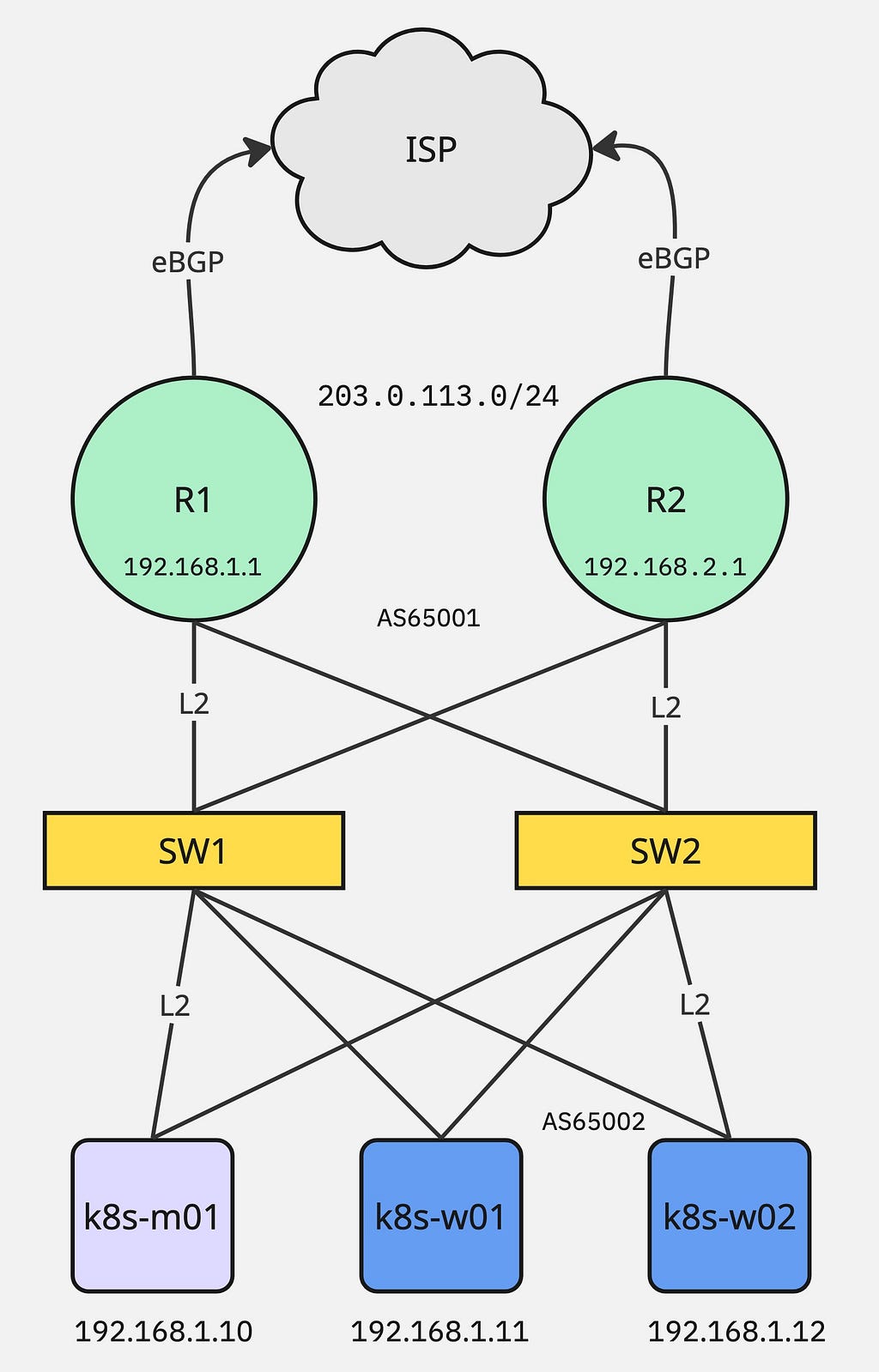
- 6 minsWith BGP integration, Kubernetes nodes establish peering relationships with network routers (edge routers). The cluster advertises service IPs (VIPs) via BGP, and routers learn these routes to send traffic directly to Kubernetes nodes.
Lab Setup
Infrastructure:
- k8s-m01 - Master node
- k8s-w01/02 - Worker nodes
- R1/R2 - Edge routers connected with ISP using eBGP, serving 203.0.113.0/24 public IP subnet
- SW1/2 - Layer 2 switches
Install Kubernetes
Install Kubernetes dependencies and kubeadm package on all 3 nodes:
## Load modules
sudo modprobe overlay
sudo modprobe br_netfilter

# Make sure it reboot persistence
cat <<EOF | sudo tee /etc/modules-load.d/k8s.conf
overlay
br_netfilter
EOF

## systemctl config flags
cat <<EOF | sudo tee /etc/sysctl.d/k8s.conf
net.bridge.bridge-nf-call-iptables = 1
net.ipv4.ip_forward = 1
net.bridge.bridge-nf-call-ip6tables = 1
EOF
# Reload sysctl
sudo sysctl --system

## Run following command to install containerd
sudo apt install -y containerd
sudo mkdir -p /etc/containerd
containerd config default | sudo tee /etc/containerd/config.toml
sudo sed -i 's/SystemdCgroup = false/SystemdCgroup = true/' /etc/containerd/config.toml
sudo systemctl restart containerd
sudo systemctl enable containerd

## Install kubeadm
sudo mkdir -p /etc/apt/keyrings
curl -fsSL https://pkgs.k8s.io/core:/stable:/v1.29/deb/Release.key | sudo gpg --dearmor -o /etc/apt/keyrings/kubernetes-apt-keyring.gpg
echo 'deb [signed-by=/etc/apt/keyrings/kubernetes-apt-keyring.gpg] https://pkgs.k8s.io/core:/stable:/v1.29/deb/ /' | sudo tee /etc/apt/sources.list.d/kubernetes.list

sudo apt update
sudo apt install -y kubelet kubeadm kubectl
sudo apt-mark hold kubelet kubeadm kubectl
Bootstrap Master Node
Run the following command on k8s-m01 node to bootstrap the master node:
$ kubeadm init \
--apiserver-advertise-address=192.168.1.10 \
--apiserver-cert-extra-sans=192.168.1.10 \
--pod-network-cidr=10.233.0.0/16 \
--skip-phases=addon/kube-proxy
Install Cilium CNI:
$ curl -L --remote-name https://github.com/cilium/cilium-cli/releases/latest/download/cilium-linux-amd64.tar.gz
$ tar xzvf cilium-linux-amd64.tar.gz
$ sudo mv cilium /usr/local/bin/

$ cilium install \
  --set k8s.apiServerURLs="https://192.168.1.10:6443" \
  --set kubeProxyReplacement=true \
  --set bgpControlPlane.enabled=true
Validate using the following command:
$ kubectl get nodes
$ kubectl get pod -n kube-system
Run the following command on Master node to obtain token for worker join command:
$ kubeadm token create --print-join-command
Install Worker Nodes
Run the join command on both worker nodes k8s-w01/02:
$ kubeadm join 192.168.1.10:6443 --token <token> --discovery-token-ca-cert-hash sha256:<hash>
Validate BGP status:
$ cilium config view | grep enable-bgp-control
enable-bgp-control-plane                          true
enable-bgp-control-plane-status-report            true
$ kubectl get crd | grep -i bgp
ciliumbgpadvertisements.cilium.io            2026-02-17T21:33:01Z
ciliumbgpclusterconfigs.cilium.io            2026-02-17T21:32:55Z
ciliumbgpnodeconfigoverrides.cilium.io       2026-02-17T21:33:19Z
ciliumbgpnodeconfigs.cilium.io               2026-02-17T21:33:13Z
ciliumbgppeerconfigs.cilium.io               2026-02-17T21:33:07Z
ciliumbgppeeringpolicies.cilium.io           2026-02-17T21:32:49Z
Configure BGP for Cilium
---
apiVersion: cilium.io/v2
kind: CiliumLoadBalancerIPPool
metadata:
  name: lb-pool-bgp1
spec:
  allowFirstLastIPs: "No"
  blocks:
    - cidr: 203.0.113.0/24
  serviceSelector:
    matchExpressions:
      - key: lb.cilium.io/pool
        operator: In
        values: ["bgp1"]

---
apiVersion: cilium.io/v2
kind: CiliumBGPAdvertisement
metadata:
  name: advertise-lb-bgp1
  labels:
    advertise: "bgp"
spec:
  advertisements:
    - advertisementType: Service
      service:
        addresses:
          - LoadBalancerIP
      selector:
        matchExpressions:
          - key: lb.cilium.io/pool
            operator: In
            values: ["bgp1"]

---
apiVersion: cilium.io/v2
kind: CiliumBGPPeerConfig
metadata:
  name: cilium-peer
spec:
  timers:
    connectRetryTimeSeconds: 5
    holdTimeSeconds: 90
    keepAliveTimeSeconds: 30
  gracefulRestart:
    enabled: true
    restartTimeSeconds: 15
  families:
    - afi: ipv4
      safi: unicast
      advertisements:
        matchLabels:
          advertise: "bgp"

---
apiVersion: cilium.io/v2
kind: CiliumBGPClusterConfig
metadata:
  name: cilium-bgp
spec:
  nodeSelector:
    matchLabels:
      node: bgp-node
  bgpInstances:
  - name: "Instance-65002"
    localASN: 65002
    peers:
    - name: "peer-R1"
      peerASN: 65001
      peerAddress: 192.168.1.1
      peerConfigRef:
        name: "cilium-peer"
    - name: "peer-R2"
      peerASN: 65001
      peerAddress: 192.168.1.2
      peerConfigRef:
        name: "cilium-peer"
Assign label to the nodes which you want to run BGP:
$ kubectl label node k8s-w01 node=bgp-node
$ kubectl label node k8s-w02 node=bgp-node
If all good then you can see the following output from cilium (assuming you have already configured BGP peers on R1/R2 for k8s-w01/w02):
$ cilium bgp peers
Node            Local AS   Peer AS   Peer Address   Session State   Uptime       Family         Received   Advertised
k8s-w01         65002      65001     192.168.1.1     established     130h36m28s   ipv4/unicast   10          2
                65002      65001     192.168.1.2     established     119h26m21s   ipv4/unicast   10          2
k8s-w02         65002      65001     192.168.1.1     established     130h36m28s   ipv4/unicast   10          2
                65002      65001     192.168.1.2     established     119h26m21s   ipv4/unicast   10          2
Run Demo App
Create the following echo.yaml file:
---
apiVersion: apps/v1
kind: Deployment
metadata:
  name: echo
spec:
  replicas: 2
  selector:
    matchLabels: { app: echo }
  template:
    metadata:
      labels: { app: echo }
    spec:
      containers:
        - name: echo
          image: ealen/echo-server:latest
          ports: [{ containerPort: 80 }]
---
apiVersion: v1
kind: Service
metadata:
  name: echo
  labels:
    lb.cilium.io/pool: bgp1
spec:
  type: LoadBalancer
  selector: { app: echo }
  ports:
    - port: 80
      targetPort: 80
$ kubectl apply -f echo.yaml
Validate loadbalancer external-ip which is the public IP assigned from your ISP announced via service using cilium/bgp:
$ kubectl get svc
NAME         TYPE           CLUSTER-IP     EXTERNAL-IP      PORT(S)        AGE
echo         LoadBalancer   10.233.24.84   203.0.113.10     80:31869/TCP   5d10h
kubernetes   ClusterIP      10.233.0.1     <none>           443/TCP        28d
$ cilium bgp routes
(Defaulting to `available ipv4 unicast` routes, please see help for more options)

Node      VRouter   Prefix            NextHop   Age        Attrs
k8s-w01   65002     203.0.113.10/32   0.0.0.0   2h35m41s   [{Origin: i} {Nexthop: 0.0.0.0}]
k8s-w02   65002     203.0.113.10/32   0.0.0.0   2h23m47s   [{Origin: i} {Nexthop: 0.0.0.0}]