Deploying Ceph Storage with BGP in an L3 Network
- 4 minsDeploying Ceph with BGP in an L3 network replaces traditional L2 spanning-tree/VLAN setups with routed, high-performance leaf-spine architectures.
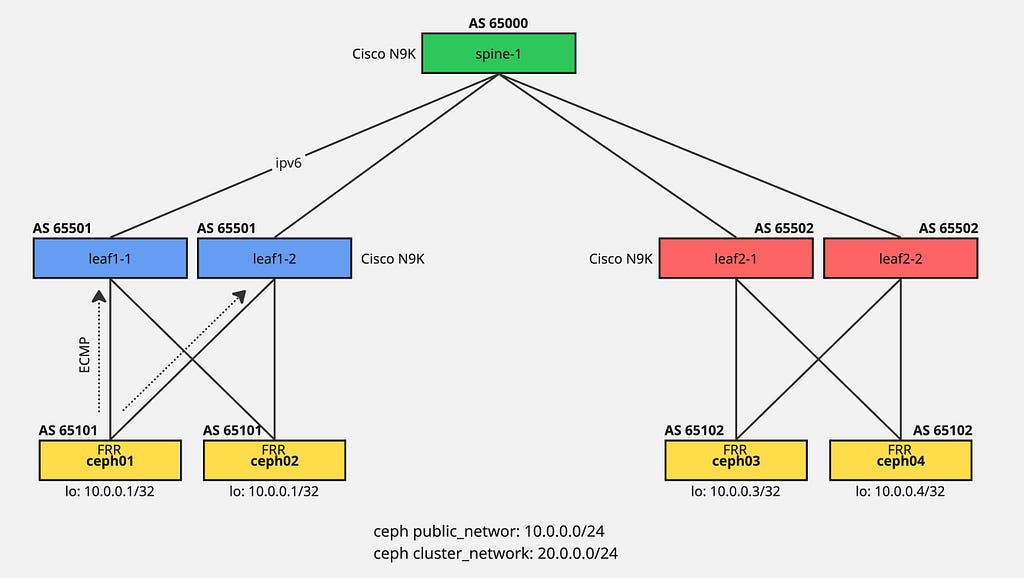
By implementing a routing daemon like FRR on Ceph nodes, OSDs and Monitors advertise their IP addresses via BGP to ToR switches, enabling equal-cost multi-path (ECMP) routing for enhanced scalability and faster network convergence.
Ceph Lab Setup
This lab environment runs on Cisco Modeling Lab in a virtual setup. Four ceph nodes execute FRR daemon to establish BGP connectivity with leaf switches as previously documented.
Network configuration:
- Public network: 10.0.0.0/24
- Cluster network: 20.0.0.0/24
Setting Up Ceph Network
The 10.0.0.0/24 loopback configuration serves as the ceph public network. A replication network interface enables ceph cluster networking.
Create Replication Network
$ ip link add rep type dummy
$ ip link set rep up
Configure FRR
Full FRR configuration example (adjust IP addresses and BGP ASN accordingly):
frr version 8.1
frr defaults traditional
hostname ceph03
log syslog informational
no ipv6 forwarding
service integrated-vtysh-config
!
interface ens2
 no ipv6 nd suppress-ra
exit
!
interface ens3
 no ipv6 nd suppress-ra
exit
!
interface lo
 ip address 10.0.0.1/32
exit
!
interface rep
 ip address 20.0.0.1/32
exit
!
router bgp 65102
 bgp router-id 10.0.0.1
 no bgp ebgp-requires-policy
 neighbor ens2 interface remote-as 65502
 neighbor ens3 interface remote-as 65502
 !
 address-family ipv4 unicast
  redistribute connected
  neighbor ens2 allowas-in
  neighbor ens3 allowas-in
 exit-address-family
exit
!
end
BGP Peering Status
ceph01# show ip bgp summary

IPv4 Unicast Summary (VRF default):
BGP router identifier 10.0.0.1, local AS number 65101 vrf-id 0
BGP table version 112
RIB entries 19, using 3496 bytes of memory
Peers 2, using 1446 KiB of memory

Neighbor        V         AS   MsgRcvd   MsgSent   TblVer  InQ OutQ  Up/Down State/PfxRcd   PfxSnt Desc
ens2            4      65501   1607027   1607066        0    0    0 13w1d08h            7       10 N/A
ens3            4      65501   1604761   1604801        0    0    0 13w1d20h            7       10 N/A

Total number of neighbors 2
BGP Route Table
ceph01# show ip bgp

BGP table version is 112, local router ID is 10.0.0.1, vrf id 0
Default local pref 100, local AS 65101
Status codes:  s suppressed, d damped, h history, * valid, > best, = multipath,
               i internal, r RIB-failure, S Stale, R Removed
Origin codes:  i - IGP, e - EGP, ? - incomplete

   Network          Next Hop            Metric LocPrf Weight Path
*> 10.0.0.1/32      0.0.0.0                  0         32768 ?
*= 10.0.0.2/32      ens2                                   0 65501 65101 ?
*>                  ens3                                   0 65501 65101 ?
*= 10.0.0.3/32      ens3                                   0 65501 65500 65502 65102 ?
*>                  ens2                                   0 65501 65500 65502 65102 ?
*= 20.0.0.1/32      0.0.0.0                  0         32768 ?
*= 20.0.0.2/32      ens2                                   0 65501 65101 ?
*>                  ens3                                   0 65501 65101 ?
*= 20.0.0.3/32      ens3                                   0 65501 65500 65502 65102 ?
*>                  ens2                                   0 65501 65500 65502 65102 ?
*= 192.168.0.1/32   ens2                                   0 65501 65500 ?
*>                  ens3                                   0 65501 65500 ?
*> 192.168.1.1/32   ens2                    20             0 65501 ?
*> 192.168.1.2/32   ens3                    20             0 65501 ?
*= 192.168.255.0/24 ens2                                   0 65501 65101 ?
*>                  ens3                                   0 65501 65101 ?

Displayed  10 routes and 16 total paths
Deploying Ceph Using Cephadm
Assuming networking infrastructure is properly configured, proceed with Ceph deployment.
Setup Loop Device for OSD Disks
$ fallocate -l 10G 10G-SSD-0.img
$ losetup -fP  10G-SSD-0.img
$ pvcreate /dev/loop0
$ vgcreate ceph-ssd-vg /dev/loop0
$ lvcreate -l 100%FREE --name ceph-ssd-lv-0 ceph-ssd-vg
Install Docker
$ apt install docker.io
Bootstrap Ceph Cluster
$ cephadm bootstrap --mon-ip 10.0.0.1 --skip-mon-network
Distribute SSH Keys
root@ceph01:~# ssh-copy-id -f -i /etc/ceph/ceph.pub root@ceph02
root@ceph01:~# ssh-copy-id -f -i /etc/ceph/ceph.pub root@ceph03
Add Monitors and OSDs
root@ceph01:~# ceph orch daemon add mon ceph02
root@ceph01:~# ceph orch daemon add mon ceph03
root@ceph01:~# ceph orch daemon add osd ceph01:/dev/ceph-ssd-vg/ceph-ssd-lv-0
root@ceph01:~# ceph orch daemon add osd ceph02:/dev/ceph-ssd-vg/ceph-ssd-lv-0
root@ceph01:~# ceph orch daemon add osd ceph03:/dev/ceph-ssd-vg/ceph-ssd-lv-0
Cluster Status Verification
After several minutes:
root@ceph01:~# ceph -s
  cluster:
    id:     0387bc46-c4ca-11f0-bd53-b3561e211a7e
    health: HEALTH_OK

  services:
    mon: 3 daemons, quorum ceph01,ceph02,ceph03 (age 58m)
    mgr: ceph01.xentoa(active, since 3w)
    osd: 3 osds: 3 up (since 55m), 3 in (since 62m)

  data:
    pools:   2 pools, 33 pgs
    objects: 10 objects, 4.4 MiB
    usage:   246 MiB used, 30 GiB / 30 GiB avail
    pgs:     33 active+clean
Configuration Dump
root@ceph01:~# ceph config dump
WHO     MASK         LEVEL     OPTION                                 VALUE
global               advanced  cluster_network                        20.0.0.0/24
mon                  advanced  public_network                         10.0.0.0/24
OSD Tree
root@ceph01:~# ceph osd tree
ID  CLASS  WEIGHT   TYPE NAME        STATUS  REWEIGHT  PRI-AFF
-1         0.02939  root default
-3         0.00980      host ceph01
 0    hdd  0.00980          osd.0        up   1.00000  1.00000
-5         0.00980      host ceph02
 1    hdd  0.00980          osd.1        up   1.00000  1.00000
-7         0.00980      host ceph03
 2    hdd  0.00980          osd.2        up   1.00000  1.00000
Validation and Failover Testing
For validation you can shutdown any link to check BGP failover and redundancy of your network. Configure BFD to achieve faster BGP failover with minimal storage impact.