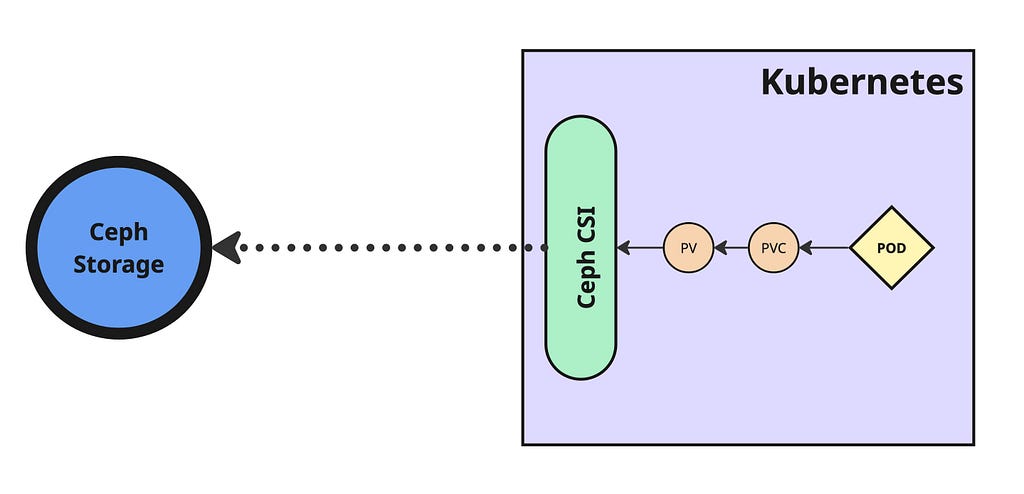
Ceph Storage Integration with Kubernetes using Ceph CSI
- 5 minsCeph is an open-source, software-defined storage platform that unifies object, block, and file storage within a single distributed system designed for scalability, fault tolerance, and performance on commodity hardware.
What Is Ceph CSI?
Ceph CSI (Container Storage Interface) integrates Ceph storage systems with Kubernetes. It encompasses RBD (block devices) and CephFS (file systems) capabilities, enabling Kubernetes to provision, attach, and manage Ceph-backed storage through standardized driver components including provisioners, attachers, resizers, and sidecars.
Why Use Ceph CSI in Kubernetes?
- Dynamic Provisioning: Automatically creates Ceph-backed volumes when PersistentVolumeClaims (PVCs) are made — no manual intervention needed.
- Versatile Storage Options: Supports both block storage via RBD and distributed file storage via CephFS.
- High Performance & Scalability: Ceph’s distributed architecture delivers high throughput and resilience through striping and replication.
- Data Redundancy & Fault Tolerance: Maintains volume accessibility and durability during node failures using replication and erasure coding.
- Snapshots & Cloning: Enables volume snapshots, cloning, backups, and rollback capabilities.
Install Ceph CSI
Create namespace:
$ kubectl create namespace ceph-csi
Clone ceph-csi repository:
$ git clone https://github.com/ceph/ceph-csi.git
$ cd ceph-csi
$ git checkout v3.15.0
$ cd charts/ceph-csi-rbd
Create values configuration file with cluster details:
cat <<EOF > ceph-csi-rbd-values.yaml
csiConfig:
  - clusterID: "44cbf9ee-fa12-11ee-b502-925c84ec9999"
    monitors:
      - "10.0.16.22:6789"
      - "10.0.16.23:6789"
      - "10.0.16.24:6789"
      - "10.0.16.26:6789"
      - "10.0.16.28:6789"
provisioner:
  name: provisioner
  replicaCount: 2
EOF
Note: Obtain clusterID and monitors from Ceph cluster using:
$ ceph fsid
$ ceph mon dump
Install Ceph CSI Helm chart:
$ helm install --namespace ceph-csi ceph-csi --values ceph-csi-rbd-values.yaml ./
Check deployment status:
$ helm status ceph-csi -n ceph-csi
$ kubectl rollout status deployment -n ceph-csi
Pre-Deployment Ceph Configuration
Before creating Storage Class, establish Ceph resources:
Create pool:
$ ceph osd pool create k8s-pool 64 64
$ rbd pool init k8s-pool
Create user and key for pool access:
$ ceph auth get-or-create-key client.k8s-user mds 'allow *' mgr 'allow *' mon 'allow *' osd 'allow * pool=k8s-pool' | tr -d '\n' | base64
QVFDNlRiSm80N0IzSnhBQTBZMWJHeER4dWFvSDg1WmZZZmtmRFE9PQ==
Encode username in base64:
$ echo "k8s-user" | tr -d '\n' | base64
azhzLWJvcy0x
Create Kubernetes secret resource:
apiVersion: v1
kind: Secret
metadata:
  name: ceph-admin
  namespace: default
type: kubernetes.io/rbd
data:
  userID: azhzLWJvcy0x
  userKey: QVFDNlRiSm80N0IzSnhBQTBZMWJHeER4dWFvSDg1WmZZZmtmRFE9PQ==
$ kubectl apply -f ceph-admin-secret.yaml
Create StorageClass
Create Ceph Storage Class with appropriate cluster and pool details:
apiVersion: storage.k8s.io/v1
kind: StorageClass
metadata:
  name: ceph-rbd-sc
  annotations:
    storageclass.kubernetes.io/is-default-class: "true"
provisioner: rbd.csi.ceph.com
parameters:
   clusterID: 44cbf9ee-fa12-11ee-b502-925c84ec9999
   pool: k8s-pool
   imageFeatures: layering
   csi.storage.k8s.io/provisioner-secret-name: ceph-admin
   csi.storage.k8s.io/provisioner-secret-namespace: default
   csi.storage.k8s.io/controller-expand-secret-name: ceph-admin
   csi.storage.k8s.io/controller-expand-secret-namespace: default
   csi.storage.k8s.io/node-stage-secret-name: ceph-admin
   csi.storage.k8s.io/node-stage-secret-namespace: default
reclaimPolicy: Delete
allowVolumeExpansion: true
mountOptions:
   - discard
$ kubectl apply -f ceph-rbd-sc.yaml
The cluster is now ready for provisioning Ceph-backed volumes for stateful applications.
Creating Test Pod and Attaching Volume
Create PersistentVolumeClaim using Storage Class:
kind: PersistentVolumeClaim
apiVersion: v1
metadata:
  name: my-ceph-pvc
spec:
  accessModes:
    - ReadWriteOnce
  resources:
    requests:
      storage: 10Gi
  storageClassName: ceph-rbd-sc
$ kubectl apply -f create-ceph-pvc.yaml
Validate PVC status:
$ kubectl get pvc
NAME              STATUS   VOLUME                                     CAPACITY   ACCESS MODES   STORAGECLASS   AGE
my-ceph-pvc       Bound    pvc-527a2da9-e017-4878-bfd1-4848e3cd0b4d   10Gi       RWO            ceph-rbd-sc    2m34s
Attach PVC to pod:
apiVersion: v1
kind: Pod
metadata:
  name: ceph-pod-pvc
spec:
  containers:
  - name:  ceph-pod-pvc
    image: busybox
    command: ["sleep", "infinity"]
    volumeMounts:
    - mountPath: /mnt/ceph_rbd
      name: volume
  volumes:
  - name: volume
    persistentVolumeClaim:
      claimName: my-ceph-pvc
$ kubectl apply -f create-pod-with-pvc.yaml
Validate pod and mounted volume:
$ kubectl get pod
NAME                  READY   STATUS    RESTARTS      AGE
ceph-pod-pvc          1/1     Running   0             10s

$ kubectl exec pod/ceph-pod-pvc -- df -k | grep rbd
/dev/rbd1             10218772        24  10202364   0% /mnt/ceph_rbd

$ kubectl get pv
NAME                                       CAPACITY   ACCESS MODES   RECLAIM POLICY   STATUS   CLAIM                   STORAGECLASS
pvc-527a2da9-e017-4878-bfd1-4848e3cd0b4d   10Gi       RWO            Delete           Bound    default/my-ceph-pvc     ceph-rbd-sc
Verify volume creation in Ceph storage:
$ rbd ls -p k8s-pool
csi-vol-8ab7c907-c64e-4894-a9d0-a05fdb487eb8

$ rbd info k8s-pool/csi-vol-8ab7c907-c64e-4894-a9d0-a05fdb487eb8
rbd image 'csi-vol-8ab7c907-c64e-4894-a9d0-a05fdb487eb8':
 size 10 GiB in 2560 objects
 order 22 (4 MiB objects)
 snapshot_count: 0
 id: c9b222339d9616
 block_name_prefix: rbd_data.c9b222339d9616
 format: 2
 features: layering
 op_features:
 flags:
 create_timestamp: Sat Aug 30 02:28:42 2025
 access_timestamp: Sat Aug 30 02:28:42 2025
 modify_timestamp: Sat Aug 30 02:28:42 2025
Ceph CSI integration with Kubernetes is now operational for managing persistent storage.